
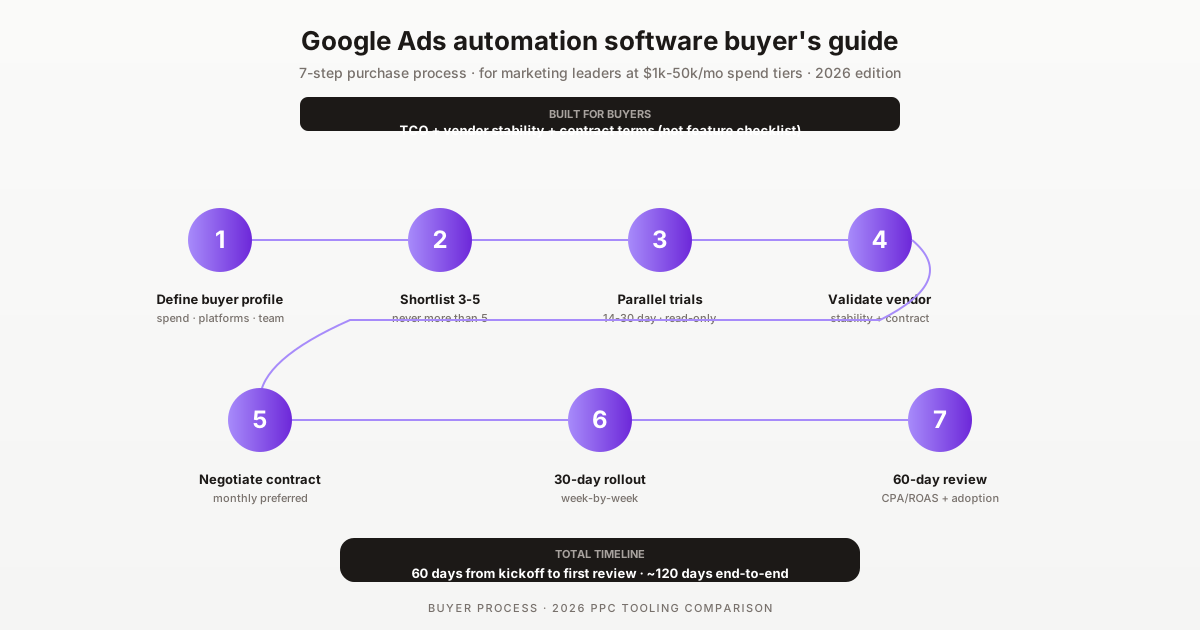

The 2026 Google Ads automation software buyer's guide for marketing leaders — VPs of Marketing, Heads of PPC, and procurement professionals evaluating tools at $1k-50k/mo spend tiers. This guide covers the 5-step purchase process, vendor due-diligence criteria, contract terms to negotiate, and the 8 most common buyer mistakes that destroy ROI. Built for buyers, not end users.
Disclosure: SteerAds is our product. We've watched many buyers make the same mistakes — paying for tools they don't need, signing annual contracts they can't exit, evaluating on feature counts rather than time-saved. This guide is structured around the decisions we see go wrong, with honest framing of when tools like ours fit versus when alternatives are better.
End users care about features, UI polish, and daily workflow. Buyers care about TCO, vendor stability, contract flexibility, and total time-to-ROI. These priorities sometimes conflict — a feature-rich tool may have terrible contract terms; a buyer-friendly tool may lack the depth end users want. This guide is for buyers; pair it with end-user evaluation from your PPC team before committing.
Who this buyer's guide is for
Buyer's guide — a structured framework for evaluating and purchasing software, written for the buyer rather than the end user. Total cost of ownership (TCO) — the full cost of software including subscription, implementation, and ongoing operating cost. Procurement — the formal organizational process for evaluating and purchasing software.
This guide is for three buyer profiles:
1. VP-Marketing or Head-of-PPC at brands with $1-50k/mo PPC spend. The buyer with budget authority over tooling. Focused on cost-benefit, vendor stability, and team enablement. Typically signs off on $100-1000/mo SaaS subscriptions or larger annual contracts.
2. Agency principal or operations lead at PPC agencies. Evaluating tools that scale across client portfolios. Per-client unit economics matter more than absolute cost. Multi-client dashboards and white-label reporting are decisive features.
3. Procurement professional supporting marketing tool evaluation. Less focused on product features, more on vendor contracts, terms, and risk. This guide helps procurement teams ask the right questions even without deep PPC expertise.
This guide is NOT for end users — PPC managers running daily optimization should consult the best Google Ads optimization software 2026 listicle for product-fit comparison instead.
The 5-step Google Ads automation purchase process
The HowTo schema above details the full 7-step playbook. Condensed 5-step buyer process:
1. Define buyer profile (1-3 days): spend tier, platform mix, team size, operating model, total tooling budget.
2. Build shortlist (3-7 days): 3-5 candidate vendors based on profile fit. Use category guides (best-X-tools listicles) for shortlist research.
3. Parallel trials (14-30 days): Free trials simultaneously, not sequentially. Score on time saved, not feature count.
4. Due diligence (5-10 days, parallel with trials): Vendor stability, contract terms, pricing transparency, security/compliance review.
5. Commit and rollout (30 days): Negotiate contract, sign, plan rollout, train team, monitor adoption.
Total timeline: typically 60 days from kickoff to full deployment. Can compress to 30 days for self-service SaaS without procurement involvement. Can extend to 90+ days for enterprise contracts requiring legal/security review.
Vendor due-diligence: 7 criteria that matter
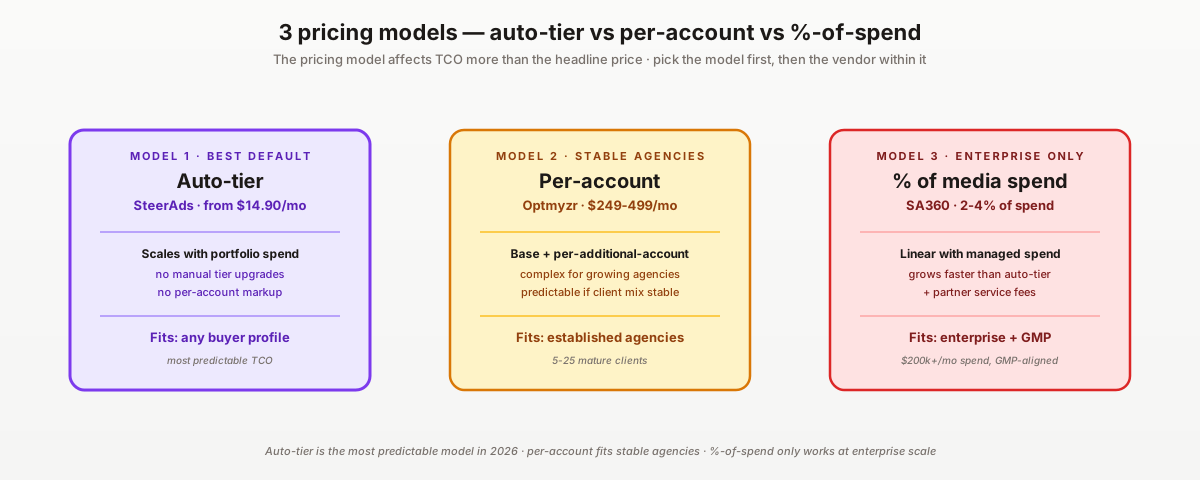
1. Pricing model — auto-tier vs per-account vs %-of-spend. Auto-tier (SteerAds from $14.90/mo, scales with spend) scales best for growing portfolios. Per-account (Optmyzr) creates cost predictability but scales with client growth. %-of-spend (SA360 2-4%) scales with managed spend and can become expensive at large scale. Match the pricing model to your business model.
2. Multi-platform support. Google + Microsoft Ads coverage has become standard in 2026. Single-platform tools (Google-only Opteo, Ryze AI; Meta-only Madgicx) are increasingly outliers. Validate that your shortlist covers your platform mix.
3. AI integration with 2026 Google Ads features. AI Max for Search, Performance Max, Demand Gen, and AI-generated assets. Tools that haven't adapted (WordStream Advisor since 2019 acquisition, older Optmyzr setups) lose value as AI campaign types dominate.
4. Contract flexibility — monthly vs annual. Monthly billing is preferable for most buyers. Annual contracts only make sense with substantial discount (15-20% off monthly) and validated long-term fit. Default to monthly.
5. Free trial without credit card. The 2026 standard is 14-30 day free trial without credit card requirement. Vendors who require credit card upfront create unnecessary friction and signal less confidence in their product.
6. Public pricing transparency. Opaque or quote-only pricing (WordStream Advisor, some enterprise tools) is a yellow flag. Public pricing pages enable apples-to-apples comparison and signal vendor maturity.
7. Vendor stability — funding, headcount, acquisition history. Well-funded vendors with 5+ years track record carry lower discontinuation risk. Recent acquisitions (like WordStream by LocaliQ in 2019) often show feature stagnation post-acquisition. Recently launched tools (post-2024) carry higher early-stage risk.
Pricing models compared: flat vs per-account vs %-of-spend
Three pricing models dominate Google Ads automation in 2026:
Auto-tier (example: SteerAds from $14.90/mo, scales with spend). One price covers unlimited accounts within reason. Pros: predictable cost, scales with portfolio growth, structurally agency-friendly. Cons: less differentiation between solo users and large agencies. Best for: growing agencies, brands with multiple account scenarios, cost-conscious buyers.
Per-account tier (example: Optmyzr $249-499/mo). Pricing scales with number of managed accounts. Pros: matches cost to value extracted, predictable per-client unit economics. Cons: cost grows with portfolio, complex billing as accounts change. Best for: agencies with stable client portfolios, brands managing 1-3 accounts.
Percentage-of-spend (example: Search Ads 360 at 2-4% of managed spend). Pricing scales with the ad spend being managed. Pros: aligns vendor incentives with brand success, no cost surprises at low spend. Cons: very expensive at high spend, can exceed value at $1M+ monthly spend. Best for: enterprise brands with predictable spend tiers, brands needing performance-aligned vendor incentives.
Hybrid models (example: WordStream Advisor — quote-only, scales with both account count and spend). Less transparent but sometimes more flexible. Best for: enterprise procurement processes that accept negotiated contracts; less ideal for cost-conscious buyers.
Match the pricing model to your business model:
- Growing agencies: auto-tier per portfolio spend (best scaling economics)
- Stable per-client brands: per-account tier (predictable unit economics)
- Enterprise: %-of-spend or hybrid (procurement-friendly)
- Cost-conscious solo: auto-tier entry or sub-tier per-account
Contract terms to negotiate (and what to refuse)
Negotiate for:
- Monthly billing preferred. If annual is mandatory, push for 15-20% discount and early-cancellation rights with 30-day notice.
- Price protection. Lock in current pricing for the contract term. Refuse vendor rights to raise prices mid-contract without notice.
- Service-level commitments. Uptime SLA (typically 99.5%+ for SaaS), data export rights, response time commitments for support tickets.
- Audit logs and data ownership. All optimization data and account history exportable at any time. Critical for migration scenarios.
- Cancellation process clarity. Written confirmation of cancellation process before signing, not after.
Refuse:
- Auto-renewal without notice window. Standard auto-renewal is acceptable; auto-renewal without an explicit cancellation notice period is not.
- Vendor lock-in via data formats. Tools that export only in proprietary formats reduce switching ability. Insist on standard formats (CSV, JSON, API access).
- Indemnification clauses unfavorable to buyer. Standard SaaS contracts have balanced indemnification. Vendor-favorable indemnification clauses are a yellow flag.
- Restrictions on competitive tool use. Some enterprise contracts include exclusivity clauses preventing parallel evaluation of competitive tools. Refuse these — they prevent the migration evaluation that protects your interests.
- Mandatory professional services bundling. Some vendors bundle expensive professional services with software licenses. Software should be available standalone, with professional services as optional add-on.
The 8 most common buyer mistakes
1. Evaluating on feature count rather than time saved. A tool with 200 features used by 5% of users is worse than one with 40 features used by 80%. Time-saved is the metric that matters.
2. Signing annual contracts before validating long-term fit. 30-day evaluation can't validate 12-month fit. Default to monthly billing for first year unless discount is substantial and validated extensively.
3. Not running parallel trials. Sequential evaluation creates recency bias — the last tool feels best. Run candidates simultaneously.
4. Trusting vendor sales claims over reviewer feedback. G2, Capterra, and Software Advice patterns across hundreds of reviews are more reliable than vendor demos. Read the 3-star reviews specifically — they show the limits.
5. Ignoring contract terms in favor of product features. A great product with a terrible contract destroys ROI when you can't exit. Equal weight on product and contract.
6. Skipping the free trial. Even confident buyers should validate via trial. Free trial without credit card is the 2026 standard — there's no reason to skip.
7. Buying the wrong tier for buyer profile. Enterprise tools (Marin, SA360) at mid-market scale create cost overruns. Mid-market tools at enterprise scale create capability gaps. Match tier to profile.
8. Not planning the post-purchase rollout. Tool purchase is 20% of the value; deployment and adoption are 80%. Plan the 30-day rollout before signing the contract.
Total cost of ownership (TCO) calculation
TCO is more than the software subscription. Three cost components:
1. Software subscription. SteerAds: from $14.90/mo auto-tier. Optmyzr: $249-499/mo + per-account scaling. Adalysis: $149+/mo with $50k spend minimum. Marin/SA360: quote-only enterprise tier.
2. Implementation cost. Self-service SaaS: 4-12 hours in-house time. Enterprise platforms: 80-200 hours including professional services. Often overlooked in cost comparisons.
3. Ongoing operating cost. 2-10 hours/week of in-house team time using the tool. At $50-100/hr internal value = $400-4k/mo. For agencies, this is billable client time; for brands, it's opportunity cost.
Sample TCO comparison for a $20k/mo PPC spend account:
- SteerAds + Looker Studio: $16/mo subscription + $2k/year implementation (one-time) + $200/mo operating = $216/mo all-in.
- Optmyzr: $249/mo subscription + $3k/year implementation + $200/mo operating = $549/mo all-in.
- Agency outsourcing: $3-5k/mo retainer + $0 implementation + $0 operating = $3-5k/mo all-in.
SaaS stack typically delivers 90%+ cost savings over agency at this spend tier. Difference between SaaS tools is smaller — choice often comes down to product fit, not TCO.
We trialed seven tools in parallel. Wasted four weeks. The second time around we picked three (SteerAds, Optmyzr, Opteo), ran them for 14 days with a clear scorecard, and committed within 20 days. The lesson: shortlist discipline matters more than feature comparison. The tool you'd pick if you only looked at three is usually the same one you'd pick from twenty.
For broader context, see our best Google Ads optimization software 2026, the 2026 Google Ads agency cost guide, the switching from agency to SaaS playbook, the top PPC automation platforms 2026, and our best PPC software for agencies 2026.
Pricing sources: SteerAds pricing · Optmyzr · Adalysis · SA360. Start the free 14-day SteerAds audit.
Sources
Official sources consulted for this guide:
FAQ
What should I look for when buying Google Ads automation software in 2026?
Seven criteria matter: (1) pricing model — auto-tier (SteerAds $14.90+/mo, scales with spend) vs per-account (Optmyzr) vs %-of-spend (SA360) — auto-tier prices fairly at every spend level without manual upgrades, (2) multi-platform support — Google + Microsoft has become standard, single-platform tools are increasingly outliers, (3) AI integration with 2026 Google features (AI Max, Performance Max, Demand Gen), (4) contract flexibility — monthly billing vs annual lock-in, (5) free trial without credit card, (6) public pricing — opaque/quote-only is a yellow flag, (7) reviewer feedback at scale (G2, Capterra patterns across hundreds of reviews, not cherry-picked quotes).
What's the total cost of ownership for Google Ads automation software?
TCO is more than the SaaS subscription. Three cost components: (1) software cost — $15-499/mo depending on tier, (2) implementation cost — typically 4-20 hours of in-house team time for setup and training, (3) ongoing operating cost — 2-10 hours/week of in-house time using the tool. For a typical mid-market account: $14.90-249/mo subscription + ~$2-8k/year in-house time = $200-400/mo all-in. Compare against the alternative cost (more time without automation, or higher agency fees) to determine the actual savings.
Should I buy Google Ads automation software with annual or monthly billing?
Monthly billing is preferable for most situations. Annual contracts (WordStream Advisor, some Optmyzr tiers) lock you in if the tool doesn't work out and create switching friction at renewal. Monthly billing (SteerAds, most modern SaaS) provides flexibility. Annual contracts only make sense when: (1) the discount is substantial (typically 15-20% off monthly), (2) you've validated the tool extensively in a free trial, (3) your operations are stable enough that you won't need to switch within 12 months. Default to monthly unless you have a specific reason.
How do I evaluate vendor stability for Google Ads tooling?
Five checks: (1) public funding and runway — well-funded vendors are more stable, (2) founding year — recently launched tools (post-2024) carry higher discontinuation risk, (3) employee count and growth trend — declining headcount is a warning sign, (4) acquisition history — recently acquired tools (like WordStream by LocaliQ in 2019) often show feature stagnation post-acquisition, (5) reviewer feedback on responsiveness — G2/Capterra reviewer comments about support quality and platform development pace. Five reputable vendors with 5+ years track record: Optmyzr, Adalysis, Marin, Opteo, SteerAds.
Is it worth paying for premium Google Ads automation if I'm already running Smart Bidding?
Depends on account scale and complexity. Smart Bidding handles bid optimization within campaigns; it doesn't handle cross-account optimization, multi-platform consolidation, audit-level recommendations, or budget reallocation across campaigns. For accounts above $5k/mo total spend, paid tooling typically pays back in time saved within the first month. Below $5k/mo, Smart Bidding plus the native Google Ads UI is usually sufficient. The break-even depends on your hourly value of time multiplied by hours saved.
What's the typical procurement timeline for Google Ads automation software in 2026?
Two scenarios: (1) Self-service SaaS (SteerAds, Optmyzr, Opteo) — procurement timeline 1-4 weeks for solo buyers, 2-8 weeks for procurement-involved buyers. Free trial allows technical evaluation in parallel with procurement process. (2) Enterprise (Marin, SA360, custom contracts) — procurement timeline 8-26 weeks including legal review, security assessment, contract negotiation, implementation planning. The enterprise process is ~10x longer because of contract complexity and stakeholder count.