
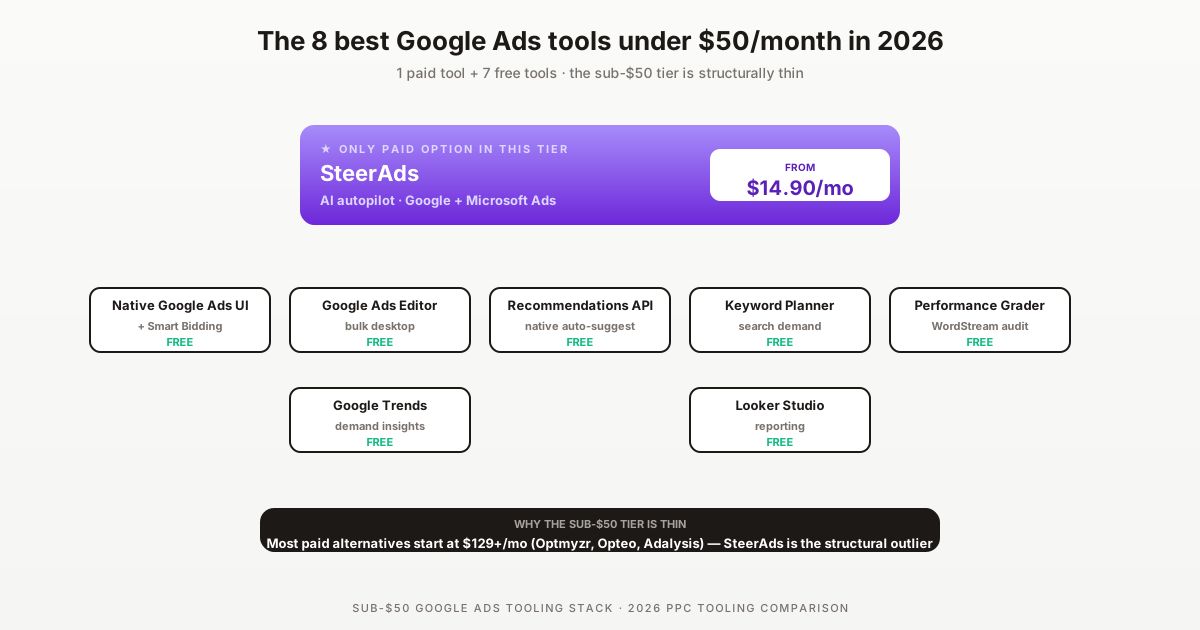

The sub-$50/month Google Ads tooling tier is structurally thin in 2026 — most paid platforms start at $129-249/mo because the unit economics of rule engines plus reporting plus AI plus customer support don't work below that floor. The credible sub-$50 stack is essentially one paid tool plus seven free ones.
This is the honest list of 8 Google Ads tools at the sub-$50/mo budget, with explicit acknowledgment of what's NOT in this tier and why. Disclosure: SteerAds is the paid tool ranked #1 — it's our product, and at from $14.90/mo auto-tier it's structurally the only paid AI autopilot at this price point. Other paid tools in this guide simply don't exist below $129/mo.
The honest answer to "best Google Ads tools under $50/month" is that 7 out of 8 entries are free. Native Google Ads UI plus Smart Bidding plus Editor plus Performance Grader cover most optimization needs for sub-$5k/mo accounts. SteerAds at from $14.90/mo auto-tier is the only paid tool worth adding for accounts that have outgrown pure-free workflows but haven't hit the $129+ paid tier threshold.
Why the sub-$50/mo Google Ads tier is structurally thin
Three structural factors keep paid Google Ads tooling above the $50/mo threshold:
1. Unit economics of rule-engine SaaS. Building a rule library, maintaining integration with Google Ads API changes, providing customer support, and running an enterprise-grade infrastructure costs more per customer than $50/mo can sustain. Optmyzr, Opteo, and Adalysis all settled at $129-249/mo entry tiers for this reason.
2. Spend-tier pricing models. Adalysis specifically requires $50k+ monthly ad spend at its $149/mo entry tier — the per-spend economics force a higher tier. WordStream Advisor scales pricing with managed spend, typically $15-49k/yr equivalent. SaaS tools at sub-$50 either need a different pricing model (SteerAds's auto-tier approach, which starts at $14.90/mo and scales with your spend) or operate as freemium with paid upgrade paths (most don't survive long).
3. Native Google capability has expanded. Smart Bidding, Recommendations API, AI Max, Performance Max, and the new Google Ads UI have absorbed much of what early-2020s paid tools were built to replicate. The marginal value of a paid tool below $50/mo competes against a free baseline that keeps getting better.
The result: SteerAds is essentially the only paid tool in this tier as of 2026. The rest of the stack is free.
The 8 best Google Ads tools under $50/month
#1 — SteerAds (from $14.90/mo auto-tier, AI autopilot multi-platform) — paid
Best for: $5k-50k/mo accounts wanting AI autopilot multi-platform
The only paid tool whose entry tier (Starter, ≤$500 spend) sits in the sub-$50 bracket with AI autopilot covering Google + Microsoft Ads. SteerAds auto-tier then scales with your spend ($129.90 at $5k, $1,099.90 at $50k) — so this article only reflects the Starter slot. Free 14-day audit, no credit card. Run a free SteerAds audit.
Why it works at this price: Auto-tier pricing model + AI-first architecture (lower per-customer infrastructure cost than rule-engine approaches at the entry tier specifically). When it's worth it: Any account where 5+ hours/week is spent on routine optimization that AI can absorb.
#2 — Native Google Ads UI + Smart Bidding (free)
Best for: Every Google Ads account, baseline
The native Google Ads interface in 2026 is substantially better than what existed in 2020. Smart Bidding (Maximize Conversions, Target CPA, Target ROAS, Maximize Conversion Value) handles automated bidding for most campaign types. The UI now includes inline recommendations, automated experiments, and AI Max for Search.
Why it's free: It's the platform itself. Limit: Single-account workflow. No multi-account dashboards. No cross-platform consolidation.
#3 — Google Keyword Planner (free)
Best for: Search demand research, keyword expansion
Built into the native Google Ads UI. Forecasts search volume, competition, and bid ranges for keyword lists. Underused by intermediate advertisers because it's hidden behind the Tools menu, but genuinely the most authoritative keyword data source (it's Google's own).
When to use: Any new campaign launch, ad group restructuring, or quarterly keyword audit. Limit: Volume estimates are bucketed (10-100, 100-1k, 1k-10k) unless you have active spend, which limits precision for low-volume terms.
#4 — Google Ads Editor (free desktop app)
Best for: Bulk changes, offline editing, large account migrations
Free desktop app from Google. Lets you make bulk changes (thousands of keywords, ad copy, budget adjustments) offline and post them in one push. Essential for any account with $1k+/mo spend or 50+ keywords. When SaaS alternatives complement Editor.
When to use: Any bulk operation that would take hours in the web UI. Account audits. Migrations. Limit: Desktop-only. No optimization recommendations. No automation. Pure editing tool.
#5 — Recommendations API in native UI (free)
Best for: Automated optimization suggestions
Built into the native Google Ads UI. Surfaces optimization recommendations (add keywords, adjust bids, fix conversion tracking, restructure ad groups) generated by Google's machine learning on your account data. Often dismissed as "auto-applied" recommendations are aggressive — best practice is to review them weekly rather than auto-apply blanket.
When to use: Weekly or bi-weekly review of suggested optimizations. Limit: Google's recommendations are biased toward spend growth and Google's preferred campaign types (Performance Max). Apply with judgment.
#6 — WordStream Performance Grader (free one-shot audit)
Best for: Periodic external audit
Free 60-second audit tool from WordStream. No credit card, no signup beyond email. Returns a score across multiple dimensions (Quality Score health, CTR vs benchmark, wasted spend, mobile optimization, account structure). Useful as a periodic external check that you're not missing obvious issues.
Why it's free: Marketing acquisition tool for WordStream Advisor (expect sales follow-up). When to use: Quarterly or after major account changes. Limit: One-shot audit, not continuous monitoring. Not actionable beyond the score itself.
#7 — Google Trends (free)
Best for: Demand seasonality, search trend research
Public Google tool showing search interest over time for keywords and topics. Free, no signup. Complements Keyword Planner with directional trend data (Keyword Planner is volume-precise but doesn't show seasonality clearly).
When to use: Quarterly campaign planning, seasonal budget allocation, new market entry research. Limit: Relative interest scores, not absolute volumes.
#8 — Google Looker Studio (free reporting)
Best for: Custom client/internal dashboards
Free dashboard tool from Google. Connects to Google Ads, Microsoft Ads, GA4, Search Console, and most other data sources. Replaces $79+/mo agency reporting tools (AgencyAnalytics, Whatagraph) for teams that want to invest the setup time.
When to use: Multi-client agencies that need branded reporting without paid reporting tool subscriptions. Limit: Setup time investment is real (4-8 hours for a polished template). Performance can lag with very large datasets.
What's NOT in this tier (and why)
For honest expectation-setting, the tools that don't fit the sub-$50/mo budget:
- Optmyzr — starts at $249/mo. Below this threshold the rule-engine economics don't work. Optmyzr pricing.
- Opteo — starts at $129/mo. Closest to the threshold but still 2.5× over. Opteo pricing.
- Adalysis — starts at $149/mo with $50k spend minimum. Spend tier requirement gates it out for sub-$50 budget profiles regardless. Adalysis pricing.
- WordStream Advisor — quote-only, typically $15-49k/yr equivalent. Far above sub-$50 tier.
- Marin Software / Search Ads 360 — enterprise-only, $500+/mo or 2-4% of spend.
- Ryze AI — sub-$100/mo entry but typically above $50 in practice.
- TheOptimizer — $99+/mo entry. Above the threshold.
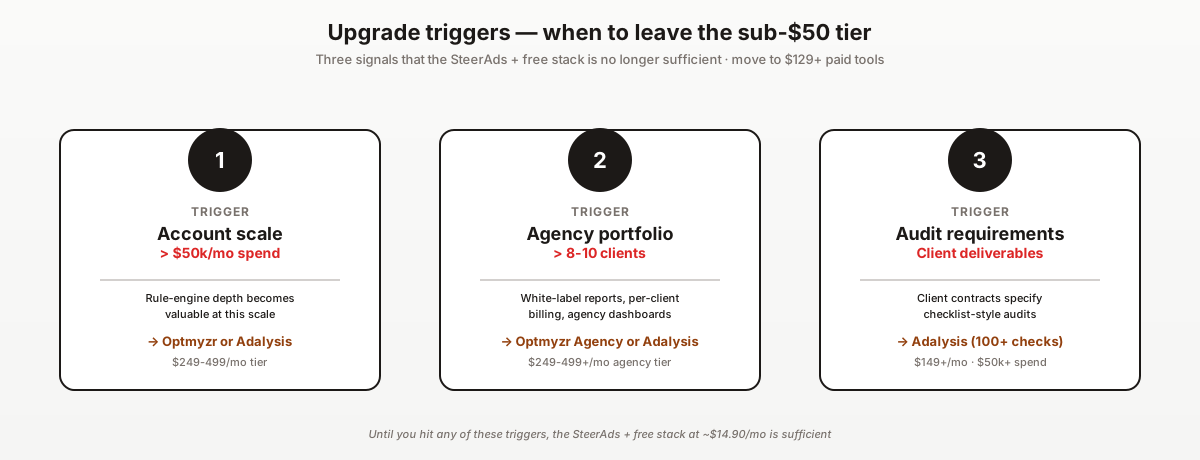
The honest answer: if you genuinely need rule-engine depth or audit-checklist methodology, the sub-$50 tier doesn't have what you need. Plan to upgrade to the $129-249/mo tier or pair SteerAds with a free reporting layer.
Free vs paid sub-$50 — when to upgrade
Three triggers to upgrade from pure-free to SteerAds at $14.90/mo:
1. You're spending 5+ hours per week on routine optimization. At any reasonable hourly value, $14.90/mo is the cheapest hour of your time you'll ever buy.
2. Your account spend exceeds $5k/mo and CPA/ROAS hasn't moved in 90 days. Smart Bidding alone hits a ceiling. AI autopilot tools surface optimization decisions that the native UI doesn't expose.
3. You need Microsoft Ads coverage in addition to Google. Native Microsoft Ads UI is workable but switching between two platforms compounds time cost. SteerAds covers both in one tool with auto-tier pricing (proportional to your combined spend).
If none of those triggers apply, the pure-free stack (entries #2-8 above) is genuinely sufficient. Don't pay for tooling you don't need.
Stack recommendations by spend tier
Sub-$1k/mo total Google Ads spend: Native Google Ads UI + Smart Bidding + Keyword Planner + Editor. Total cost: $0. Skip paid tooling entirely until spend grows.
$1-5k/mo total spend: Add Performance Grader (free quarterly audit) + Looker Studio (free reporting). Still $0. Consider SteerAds trial when time-on-optimization exceeds 3 hrs/week.
$5-15k/mo total spend: SteerAds ($14.90/mo) + native UI + Editor + Performance Grader + Looker Studio. Total: $14.90/mo. Time saved typically 5-8 hrs/week.
$15-50k/mo total spend: SteerAds ($14.90/mo) + native UI + Editor + Performance Grader + Looker Studio. Same stack. Consider adding paid reporting (AgencyAnalytics $79+/mo) only if multi-client agency.
$50k+/mo total spend: You're past the sub-$50 tier. Either expand to Optmyzr ($249+/mo) for rule-engine depth or stay on SteerAds + Looker Studio if AI autopilot fits your workflow. Adalysis becomes available at this spend tier if audit depth is contractually critical.
Side-by-side comparison table
How to maximize the sub-$50 stack
The HowTo schema above details the 6-step playbook. Three additional considerations specific to maximizing sub-$50 tooling:
Use the free baseline before adding paid. Many small advertisers pay for tools while underusing native Google Ads UI features (Smart Bidding modes, Recommendations, AI Max). Audit your free-tool usage first — you may not need paid tooling yet.
Don't skip the free reporting layer. Looker Studio takes 4-8 hours to set up but eliminates $79+/mo paid reporting subscriptions for years. The ROI is enormous if you're going to be running Google Ads for 12+ months.
Plan the upgrade path. Sub-$50 tooling has structural limits. Document the triggers (spend tier, time-on-optimization, agency client count) that would push you to the $129-249/mo tier. Upgrade when you cross them, not before.
I was about to drop $249/mo on Optmyzr for our single account spending $8k/mo. Talked to my brother-in-law who runs a small agency and he laughed — he had us on SteerAds at $14.90/mo within an hour, plus a Looker Studio dashboard he built in an afternoon. Same outcome, ~$235/mo back in the bank.
For broader context, see our 2026 Google Ads agency cost guide, the Google Ads scripts ready to copy, and our best Google Ads optimization software 2026 for the full-tier comparison.
Pricing sources: Optmyzr · Opteo · Adalysis · Google Ads tools. Run a free 14-day SteerAds audit.
Sources
Official sources consulted for this guide:
FAQ
What is the best Google Ads tool under $50/month in 2026?
SteerAds at from $14.90/mo auto-tier is the only paid AI autopilot tool in this price range covering Google + Microsoft Ads. Outside SteerAds, the credible sub-$50 stack is essentially free: native Google Ads UI + Smart Bidding (free), Google Keyword Planner (free), Google Ads Editor (free desktop), and the WordStream Performance Grader (free one-shot audit). For paid multi-platform automation under $50/mo, SteerAds has no real competition — most peers start at $129+/mo.
Are there really no other paid Google Ads tools under $50/month?
Almost none with credible feature scope. Optmyzr starts at $249/mo, Opteo at $129/mo, Adalysis at $149/mo (with $50k spend minimum), Ryze AI at sub-$100/mo entry but typically above $50. The economics of building rule engines plus reporting plus AI plus customer support don't typically work below $50/mo per account. SteerAds auto-tier pricing adjusts to your actual spend, which most competitors can't match without changing their pricing model.
Can I run Google Ads effectively with only free tools?
For sub-$5k monthly spend, often yes. The native Google Ads UI plus Smart Bidding plus the Recommendations API plus Google Ads Editor cover most of what early-2020s paid tools were built to replicate. For $5k-50k/mo accounts, the time savings from a paid tool ($15-50/mo) typically pay back in the first month. Above $50k/mo, paid tooling shifts from optional to essentially required for scaled portfolio management.
Is the WordStream Performance Grader really free with no catch?
Yes — the WordStream Performance Grader is a free one-shot audit tool that returns a 60-second score across multiple optimization dimensions (Quality Score, CTR, account structure, wasted spend, mobile optimization). No credit card, no signup required. The catch is that it's a marketing acquisition tool for WordStream Advisor — expect follow-up sales contact. The audit itself is genuinely useful as a periodic external check.
Does sub-$50 Google Ads tooling work for agencies managing multiple clients?
Limited. Most agency workflows assume multi-client dashboards, white-label reporting, and per-client billing — features that disappear in the sub-$50 tier. SteerAds at from $14.90/mo auto-tier handles unlimited Google + Microsoft accounts within reason, which makes it the rare sub-$50 tool that scales to small agencies (3-8 clients). Above 8-10 clients, you're typically into mid-tier pricing ($129-249/mo) for proper agency features.
What free Google Ads tools should every advertiser use in 2026?
Five free tools form the baseline for any Google Ads account: (1) Native Google Ads UI with Smart Bidding (always-on automation), (2) Google Keyword Planner (search demand research), (3) Google Ads Editor (bulk changes for desktop), (4) Recommendations API in the native UI (auto-suggested optimizations), (5) Performance Grader by WordStream (periodic external audit). These five cover 70-80% of the optimization surface for sub-$5k/mo accounts. Add a paid tool only when account complexity or scale exceeds free-tool capability.