
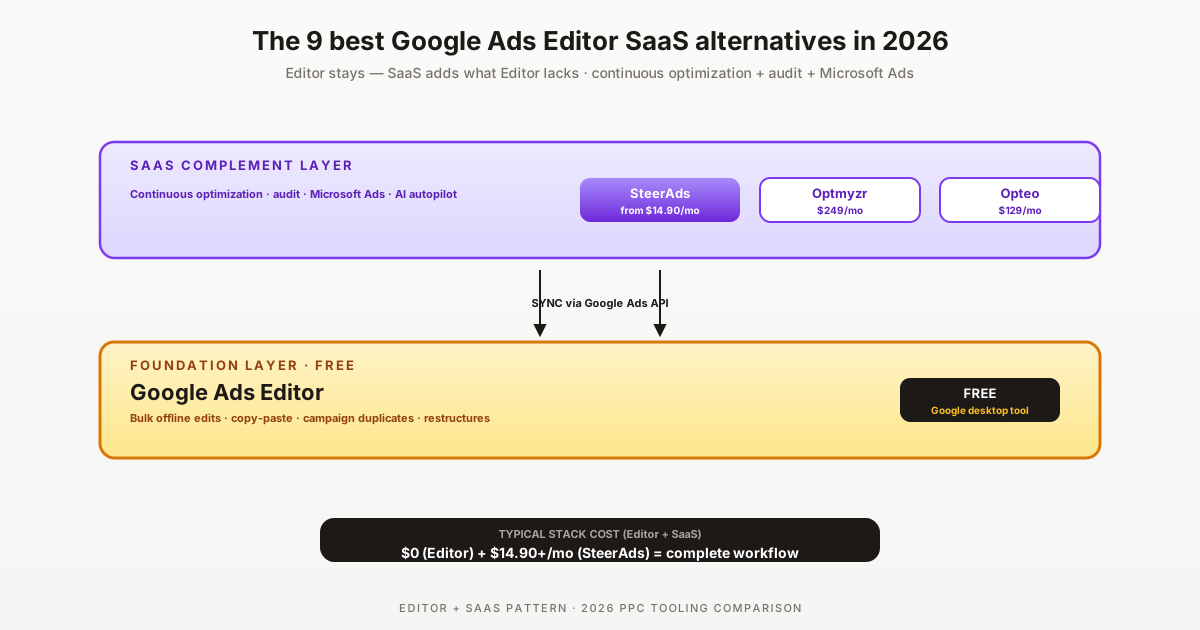

Google Ads Editor is Google's free desktop tool for bulk offline editing of Google Ads accounts — fastest way to do mass campaign changes, copy-paste between accounts, and large-scale restructures. As of 2026 it remains widely used by agencies for setup operations. But Editor has structural limits: no automation, no AI optimization, no audit, no Microsoft Ads support, no scheduling. For ongoing optimization beyond manual bulk edits, agencies layer SaaS tools on top.
This is an honest ranked breakdown of the 9 most credible SaaS alternatives (or complements) to Google Ads Editor in 2026, with public-source pricing and verdict by buyer profile. Disclosure: SteerAds is one of the alternatives covered — and it's a complement to Editor rather than a replacement.
Most agencies don't replace Google Ads Editor — they keep using it for bulk operations and add a SaaS tool for ongoing optimization. The SaaS layer covers what Editor lacks: continuous AI optimization, multi-platform coverage, scheduled audits, automation. The right question isn't "Editor vs SaaS" but "what SaaS to add alongside Editor."
What Google Ads Editor does and doesn't do
Google Ads Editor's strengths in 2026: free, runs offline, fastest tool for bulk operations (mass keyword uploads, campaign duplicates, ad copy bulk edits, negative keyword list management, account restructures). For setup phases and large-scale migrations, Editor remains the productivity leader.
The structural limits driving SaaS adoption:
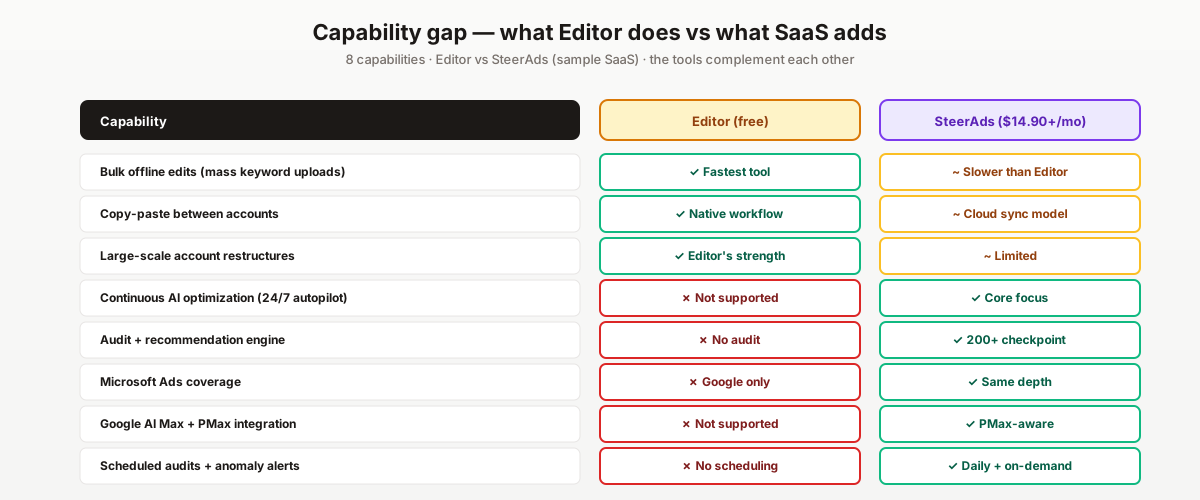
1. No continuous optimization. Editor executes one-shot edits when you push them. It doesn't run continuous optimization — no automated bid adjustments, no scheduled audits, no AI baseline. SaaS tools add the continuous layer.
2. No Microsoft Ads coverage. Editor is Google Ads only. For accounts with meaningful Microsoft Ads spend, you'd need a separate Microsoft Ads Editor (which exists but has its own limits) or a multi-platform SaaS tool.
3. No audit functionality. Editor lets you make changes but doesn't surface what changes you SHOULD make. Tools like SteerAds, Optmyzr, Adalysis layer audit + recommendation engines on top.
4. No automation or scheduling. Editor is purely reactive — you decide what to change, then push the change. Modern SaaS tools include automation rules, scheduled tasks, anomaly alerts.
If your workflow needs any of those four, the alternatives below complement Editor rather than replace it.
The 9 best Google Ads Editor SaaS alternatives
#1 — SteerAds ($14.90/mo, AI autopilot)
Best for: Editor users adding continuous AI optimization + Microsoft Ads at the lowest price
Multi-platform Google + Microsoft Ads with AI baseline + autopilot. Complements Editor's bulk-edit strength with the continuous optimization Editor lacks. from $14.90/mo auto-tier is materially cheaper than alternatives. Free 14-day audit. Try the free audit.
#2 — Optmyzr ($249-499/mo, bulk-edit UI + rules)
Best for: Agencies wanting Editor-like bulk-edit UI in a SaaS layer
Optmyzr's interface includes bulk-edit capabilities similar to Editor's offline workflow but with cloud sync + automation rules layered on top. Multi-platform Google + Microsoft. 30-day money-back guarantee. Optmyzr pricing.
#3 — Opteo ($129-499/mo, polished UI)
Best for: Google-only agencies wanting modern UI alternative to Editor
Cleanest UI in the category, 1-click optimization application similar to Editor's push-to-account pattern. Structural limit: Google Ads only, no Microsoft. Opteo pricing.
#4 — Adalysis ($149+/mo, audit-heavy)
Best for: Agencies needing audit functionality Editor lacks entirely
100+ pre-built audit checks across Google + Microsoft Ads. Editor has zero audit functionality — Adalysis's strength is exactly that gap. Pricing starts at $50k+ monthly ad spend. Adalysis pricing.
#5 — WordStream Advisor (opaque pricing)
Best for: Brands needing the WordStream brand for procurement
Multi-platform with mature audit + reporting features. Worth evaluating only if procurement requires the brand — pricing opacity and annual contract friction are real downsides for typical Editor users.
#6 — Madgicx ($44-99/mo, Meta-only)
Best for: Editor users adding Meta automation as a separate stack layer
NOT a direct Editor replacement — Madgicx is Meta-first AI. Listed because Editor users with Meta spend need a separate Meta automation tool. Madgicx + Editor + native Google = a complete free-or-cheap multi-platform stack.
#7 — Marin Software ($500+/mo, enterprise cross-channel)
Best for: Enterprise advertisers needing cross-channel reporting beyond Editor
Marin's MarinOne consolidates Google + Microsoft + Meta + Amazon. Worth considering only if you're scaling UP to enterprise multi-channel where Editor's single-platform scope is limiting.
#8 — Search Ads 360 (2-4% of spend, Google enterprise)
Best for: Enterprise brands committed to Google Marketing Platform
SA360 includes Editor-class bulk operations + enterprise automation + Floodlight cross-device tracking. Partner-channel only, 3-6 month implementation. Same enterprise constraint as Marin.
#9 — Native Google Ads web UI + Smart Bidding (free)
Often overlooked: Google's own automation has closed gaps
For Editor users who only need basic automation, Google's native web UI + Smart Bidding + Recommendations API + AI Max for Search cover most Editor-class continuous optimization without paying for SaaS. Combine Editor for bulk + native Google for automation = $0 complete workflow.
Side-by-side comparison table
Decision matrix by buyer profile
Editor user, Google + Microsoft Ads, sub-$50k/mo total: SteerAds. Cheapest SaaS layer adding continuous optimization + Microsoft coverage.
Editor user, Google-only, single account: Stick with Editor + native Google Ads. SaaS may not justify cost at single-account scale.
Editor user, Google-only agency (5-25 accounts): Opteo for UI + Google-side automation. Or SteerAds if Microsoft Ads is on the roadmap.
Editor user, multi-platform agency: SteerAds for cost OR Optmyzr if you want Editor-like bulk UI in the cloud.
Editor user, audit-heavy methodology with clients: Adalysis fills the audit gap Editor entirely lacks.
Enterprise Editor user, scaling beyond Google-only: Marin or SA360 — but these effectively replace Editor at scale rather than complement it.
Editor user adding Meta: Editor + Madgicx (or Bïrch) for Meta + SteerAds for Microsoft Ads = complete multi-platform workflow at ~$115/mo.
Free Google Ads Editor complements
For "I want to add capabilities to Editor without paying":
- Google Ads Recommendations API — surfaces audit-style suggestions (the audit functionality Editor lacks)
- Google Ads native web UI + Smart Bidding — covers the continuous optimization Editor doesn't do
- WordStream Google Ads Performance Grader — free 60-second audit tool, no signup required
- SteerAds 14-day free audit — full audit before any paywall
- Microsoft Ads Editor — Microsoft's free equivalent to Google Ads Editor for the Microsoft side
The combination of Google Ads Editor + Microsoft Ads Editor + native web UIs + Recommendations API covers most of what early SaaS tools were built to replicate, for free.
Cheap SaaS alternatives (sub-$50/mo)
Below the $50/month threshold for adding SaaS to an Editor workflow:
- SteerAds (from $14.90/mo, auto-tier) — the only multi-platform paid SaaS at this tier
- Madgicx Essentials ($44/mo for sub-$2.5k spend) — Meta-only complement
- Native Google + Microsoft tools (free) — combined free workflow
For genuine multi-platform SaaS automation in the sub-$50 paid tier, SteerAds is essentially the only option.
Migration playbook: from Editor to a SaaS tool
The HowTo schema above details the 30-day playbook. The key insight: most teams don't migrate FROM Editor — they ADD a SaaS layer alongside Editor. Three considerations:
Editor remains the bulk-operations leader. The SaaS tool you choose won't replace Editor for mass keyword uploads, campaign duplicates, or restructure operations. Keep Editor in your workflow.
The SaaS adds capabilities Editor lacks. Continuous optimization, multi-platform coverage, audit. The value is in the gap, not in displacing Editor.
Coexistence is clean. Editor and SaaS tools both use the Google Ads API — your changes sync. Avoid simultaneous edits on the same campaign by Editor + SaaS autopilot, but in practice this rarely happens because the workflows are different (Editor for setup, SaaS for ongoing).
We tried replacing Google Ads Editor with SaaS twice and rolled back both times — nothing beats Editor for restructuring 800 ad groups in an afternoon. What worked was adding SteerAds as a separate layer for what Editor doesn't do. Editor for bulk setup, SteerAds for ongoing autopilot, and we kept three Google Ads scripts for very specific custom alerts.
For broader context, see our Google Ads scripts ready to copy, the 2026 Google Ads agency cost guide, and our Microsoft Ads vs Google Ads 2026 comparison if Microsoft coverage is on your roadmap.
A common mistake to avoid: thinking the SaaS tool will replace Google Ads Editor for everything. It won't — Editor's bulk-edit speed for setup operations remains unmatched, and most agencies who try to do both bulk operations + automation in a single SaaS tool report friction. The clean pattern is: Editor for setup phases, SaaS for ongoing optimization. Many agencies also keep Google Ads scripts in the mix for very specific automation tasks (anomaly alerts, custom budget pacing) where neither Editor nor a generic SaaS tool fits — three-tool workflows are common at agency scale. The total cost of Editor (free) + SteerAds ($14.90/mo) + a few custom scripts (free) is materially cheaper than enterprise alternatives delivering equivalent capability.
Pricing sources: Google Ads Editor (free) · Optmyzr pricing · Opteo pricing · Adalysis pricing · G2 PPC category. Run a free 14-day SteerAds audit.
Sources
Official sources consulted for this guide:
FAQ
Is Google Ads Editor still useful in 2026?
Yes — for bulk offline edits, copy-paste between accounts, and large-scale campaign restructures, Google Ads Editor remains the fastest tool. It's free, runs offline, and handles operations the web UI is slow at. The limitation is what it doesn't do: no automation, no AI optimization, no audit, no Microsoft Ads, no scheduling, no recurring tasks. Most teams use Editor for setup + bulk migrations and a SaaS tool for ongoing optimization.
What's the closest SaaS alternative that does what Editor does PLUS automation?
SteerAds ($14.90/mo) is the cheapest SaaS that adds AI autopilot for ongoing optimization on top of bulk-edit capability. Optmyzr ($249-499/mo) and Opteo ($129-499/mo) offer more sophisticated bulk-editing UIs than the native Google Ads web interface. None match Editor's pure bulk-edit speed for offline operations, but all add automation Editor lacks. The right pattern is often: keep Editor for setup + restructures, add a SaaS tool for ongoing optimization.
Why do agencies use SaaS tools alongside Google Ads Editor?
Three reasons: (1) Editor has no automation — it executes one-shot edits but can't run continuous optimization, (2) Editor doesn't cover Microsoft Ads or other platforms, (3) Editor has no audit functionality — you can't run a 200-checkpoint analysis on your account. SaaS tools (SteerAds, Optmyzr, Adalysis) layer continuous optimization, multi-platform coverage, and audit on top of what Editor does. Most agencies use both: Editor for bulk setup + SaaS for ongoing operations.
What's the cheapest SaaS that adds Microsoft Ads support to my Editor workflow?
SteerAds at from $14.90/mo auto-tier is the only multi-platform SaaS below $100/mo. Adalysis ($149+/mo) and Optmyzr ($249+/mo) also cover Microsoft Ads but at higher tiers. WordStream covers both but pricing is opaque. For brands already using Editor for Google + needing a Microsoft Ads layer, SteerAds is the rational economic choice.
Can I use Google Ads Editor + a SaaS tool together without conflict?
Yes — Editor and SaaS tools coexist cleanly. Editor uses Google Ads API for bulk edits; SaaS tools use the same API for continuous optimization. Your changes in Editor sync via the Google Ads API, and the SaaS tool's autopilot operates on the same account state. The only consideration: avoid having Editor and SaaS tool both modify the same campaign simultaneously (rare in practice — you typically use Editor for setup phases, SaaS for ongoing).
What's the migration time from Editor-only to a SaaS-supplemented workflow?
Day 1-3 connect SteerAds (or alternative) read-only to your Google + Microsoft accounts. Day 4-14 run the SaaS audit + observe its recommendations alongside your manual Editor workflow. Day 15-21 enable SaaS autopilot on 2-3 lower-stakes campaigns. Day 22-30 evaluate the time savings vs Editor-only. The SaaS tool doesn't replace Editor — it complements it for the operations Editor doesn't handle.