
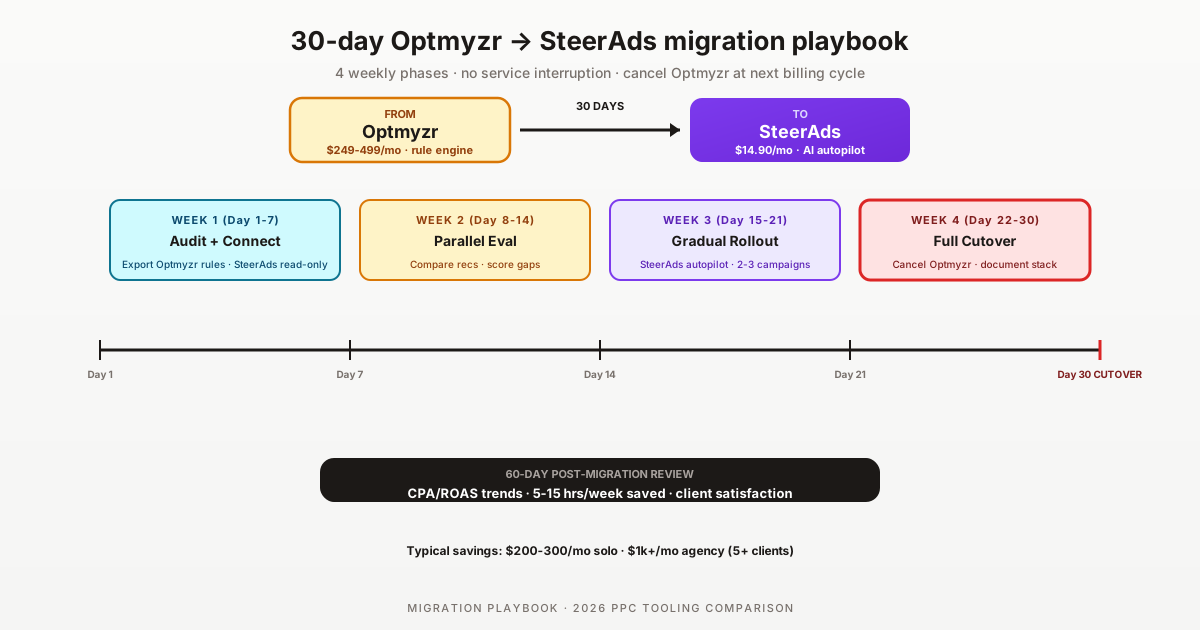

Migrating from Optmyzr to SteerAds is one of the most common 2026 tool transitions for PPC teams that have outgrown rule-engine workflows or simply can't justify $249-499/mo against SteerAds's from $14.90/mo auto-tier. This is the structured 30-day playbook for executing the migration without service interruption — including what to do about Optmyzr's rule library, reporting templates, and any contractual obligations to clients.
Disclosure: SteerAds is our product. We've helped agencies migrate from Optmyzr through this playbook; the cost savings alone typically justify the migration, but the workflow shift from rule-engine to AI autopilot matters more in practice. This guide is honest about when migration is the right choice and when it's not.
Optmyzr at $249/mo vs SteerAds at $14.90/mo is savings vs Optmyzr at lower spend tiers, which compounds across agency portfolios. But the bigger question is workflow preference: Optmyzr's rule engine requires you to define what gets automated; SteerAds's AI autopilot decides for you. Teams that prefer explicit rule control may stay on Optmyzr; teams open to AI autopilot usually find the migration meaningful well beyond the cost savings.
Why agencies migrate from Optmyzr to SteerAds in 2026
Migration — the process of transitioning a PPC tool stack from one platform to another. Tool migration — specifically the transition between SaaS PPC optimization platforms. Rule library migration — translating predefined automation rules from one tool's syntax to another's paradigm.
Three patterns drive Optmyzr to SteerAds migrations in 2026:
1. Cost — savings vs Optmyzr depend on spend tier (significant at sub-$5k, ~comparable mid-tier). Optmyzr starts at $249/mo and scales to $499+/mo for Pro tier or higher per-account pricing. SteerAds at from $14.90/mo auto-tier covers unlimited Google + Microsoft accounts within reason. For solo PPC managers, the savings are $200-300/mo; for agencies with 5+ clients, savings compound to $1k+/mo when accounting for per-account Optmyzr billing.
2. AI integration — particularly AI Max for Search. Optmyzr's rule engine was built for traditional Search + Shopping campaign optimization. AI Max for Search, Performance Max, and Demand Gen require different automation logic that's harder to express in rule syntax. SteerAds was built around AI autopilot from the start and integrates cleanly with Google's AI-driven campaign types.
3. Workflow simplification. Optmyzr's rule library depth is genuinely best-in-class but also requires meaningful time investment to build and maintain. Teams that prefer to delegate optimization decisions to AI rather than encode them as rules find SteerAds's autopilot model less labor-intensive.
If any of those three describe your situation, migration deserves evaluation. The next sections cover the structured playbook.
Pre-migration: what you'll lose, what you'll gain
You'll lose:
- Optmyzr's deep rule customization (200+ rule templates, fine-grained logic)
- Built-in white-label reporting with mature templates
- 10+ years of rule library maturity and edge-case handling
- Specific integrations with Optmyzr's ecosystem partners
You'll gain:
- savings vs Optmyzr at lower spend tiers (often $1k+/mo for agencies)
- AI autopilot decisioning across AI Max, Performance Max, Demand Gen
- 5-15 hours/week saved on rule-library maintenance
- Multi-platform Google + Microsoft in auto-tier pricing (proportionally follows your spend)
- Simpler onboarding for junior team members
You'll need to replace:
- White-label reporting: Looker Studio (free, 4-8 hours setup) or AgencyAnalytics ($79+/mo)
- Specific rule logic critical for client deliverables: replicate as SteerAds overrides
- Custom Optmyzr scripts or integrations: rebuild via SteerAds API if needed
Most teams find the gains outweigh the losses, especially when paired with Looker Studio for the reporting layer. The migration cost is real (~30 days of partial team attention) but pays back within 60-90 days through cost savings and time saved.
30-day migration playbook (week-by-week)
The HowTo schema above details the day-by-day playbook. Week-by-week summary:
Week 1 (days 1-7): Audit and connect. Export Optmyzr data. Connect SteerAds free 14-day audit. Read-only mode for both tools.
Week 2 (days 8-14): Parallel evaluation. Compare recommendations daily. Document where each tool surfaces different decisions. Build a confidence baseline before any writes.
Week 3 (days 15-21): Gradual rollout. Switch SteerAds to write access on 2-3 lower-stakes campaigns. Keep Optmyzr active on the rest. Monitor CPA/ROAS daily.
Week 4 (days 22-28): Full cutover. Expand SteerAds autopilot to the full portfolio. Replicate any contractually required rule logic as overrides.
Days 29-30: Cancel and document. Cancel Optmyzr. Document the new stack. Train team on AI autopilot workflow.
Day 60: Post-migration review. Validate CPA/ROAS, time-on-optimization, and client satisfaction with new reporting layer.
Replicating your Optmyzr rule library in SteerAds
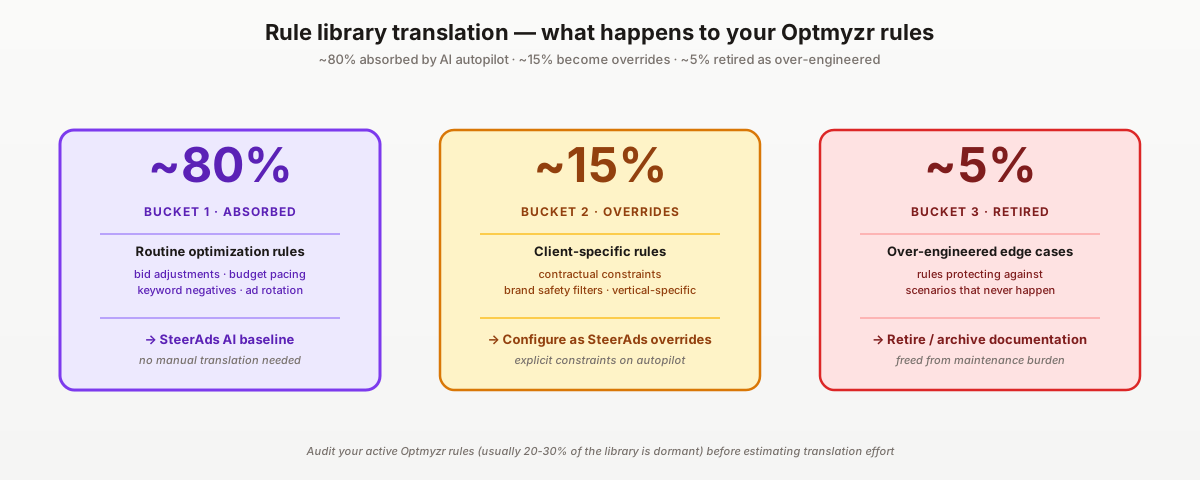
The biggest concern in any rule-engine-to-AI-autopilot migration is "what about my rules?" Three patterns for handling Optmyzr rules in SteerAds:
Category 1: Rules absorbed by SteerAds AI autopilot (typically 80% of active rules). Most Optmyzr rules — pause low-CTR keywords, adjust bids on high-CPA terms, reallocate budgets to high-ROAS campaigns — are decisions SteerAds's AI makes automatically based on account data. You don't need to recreate these; SteerAds is doing them differently but with similar outcomes.
Category 2: Rules that need SteerAds overrides (typically 15% of active rules). Specific business logic that AI wouldn't infer — e.g., "never bid above $X on this brand keyword regardless of conversion data" or "pause this campaign during Q4 for compliance reasons." SteerAds supports overrides for these via campaign-level settings.
Category 3: Rules that should be retired (typically 5% of active rules). Many Optmyzr rule libraries accumulate rules over time that are either redundant, never trigger, or actively counterproductive. The migration is a good time to audit and retire these — most teams find their effective rule count drops 40-60% during this exercise.
Translation workflow: export Optmyzr rules → categorize each (absorbed/override/retire) → configure SteerAds overrides for category 2 → document category 3 retirements.
What to do about Optmyzr's reporting templates
Optmyzr's built-in white-label reporting is a real value. After migration, three replacement options:
Looker Studio (free, 4-8 hours setup per template): Build branded report templates that connect to Google Ads, Microsoft Ads, and SteerAds data. Free, fully customizable. Setup time investment is real but one-time per template. Best for cost-conscious agencies or solo PPC managers.
AgencyAnalytics ($79+/mo, white-label client portal): Premium white-label reporting platform. Connects to 70+ data sources including Google Ads + Microsoft Ads. Polished templates out-of-the-box. Best for mid-size agencies that want polish without the Looker Studio setup time.
Whatagraph ($249+/mo, premium reporting): Higher-tier white-label reporting. ~3x AgencyAnalytics pricing for similar core functionality plus light automation. Best for larger agencies where reporting polish is a differentiator.
Recommended stack: SteerAds ($14.90/mo) + Looker Studio (free) for solo/small agencies; SteerAds + AgencyAnalytics ($79+/mo) for mid-size; SteerAds + Whatagraph ($249+/mo) for premium. Total agency cost still undercuts Optmyzr's $249-499/mo significantly.
Migration risks and how to mitigate them
Risk 1: AI autopilot decisions diverge from Optmyzr-managed baseline. Mitigation: 14-day read-only evaluation period before any writes. Switch to write access on lower-stakes campaigns first. Monitor CPA/ROAS daily during week 3.
Risk 2: Client reporting gap during transition. Mitigation: Set up Looker Studio or AgencyAnalytics in week 1, before canceling Optmyzr. Run both reporting systems in parallel for the first month so clients don't notice the transition.
Risk 3: Junior team members trained on Optmyzr workflows struggle with AI autopilot model. Mitigation: Document the workflow shift before cutover. Train team on SteerAds's interface and decision-review process. Provide a fallback to Optmyzr's mental model for the first 30 days post-migration.
Risk 4: Specific Optmyzr integration (e.g., custom scripts, ecosystem partner connections) doesn't exist in SteerAds. Mitigation: Inventory Optmyzr integrations in week 1. Use SteerAds API for custom integrations if needed. For ecosystem partners, evaluate whether the partner's value justifies staying on Optmyzr or migrating to a SteerAds-compatible alternative.
Risk 5: CPA/ROAS regression during the first 7-14 days of autopilot. Mitigation: AI autopilot needs ~7-10 days to build account-specific baselines. Expect mild fluctuation in the first week. Don't make hasty decisions to abandon migration during this window — wait until day 14-21 to assess the new steady state.
When NOT to migrate from Optmyzr
The migration isn't right for every team. Three scenarios where staying on Optmyzr is the rational choice:
1. Client contracts specifically reference Optmyzr deliverables. If client agreements name Optmyzr as part of the service (rule library audit reports, specific Optmyzr-formatted dashboards), changing tools breaks the contract obligation. Renegotiate at contract renewal or stay on Optmyzr.
2. Your team explicitly prefers rule-engine control over AI autopilot. Some PPC managers value the explicit "I decide what gets automated" model that rule engines provide. SteerAds's AI-decides-for-you model is structurally different. If your team's strong preference is rule control, stay on Optmyzr.
3. Your account complexity rewards customization over autopilot. Highly customized accounts with deep vertical-specific automation logic may be better served by Optmyzr's rule depth. AI autopilot generalizes well across most account types but may underperform on edge cases that require nuanced human-defined logic.
If any of those three apply, the migration savings don't justify the workflow disruption. Stay on Optmyzr and reassess at the next contract renewal cycle.
We followed this playbook to the day. The hardest part was week 2 — looking at SteerAds's recommendations side-by-side with Optmyzr's and accepting that the AI was catching things our rule library wasn't. By week 4 we'd freed up roughly $5k/year per client on tooling and gave our senior account manager 8 hours back per week. Wish we'd done it 18 months earlier.
For broader context, see our SteerAds vs Optmyzr honest comparison, the best Google Ads optimization software 2026, the Optmyzr alternatives 2026 listicle, the best PPC software for agencies 2026, and our 2026 Google Ads agency cost guide.
Pricing sources: Optmyzr pricing · SteerAds pricing · AgencyAnalytics · Looker Studio. Start the free 14-day SteerAds audit.
Sources
Official sources consulted for this guide:
FAQ
Is migrating from Optmyzr to SteerAds worth it in 2026?
For most accounts, yes on cost alone — Optmyzr starts at $249/mo while SteerAds is from $14.90/mo auto-tier (savings vs Optmyzr depend on spend tier (significant at sub-$5k, ~comparable mid-tier)). For agencies with multi-client portfolios, the savings compound significantly. The workflow shift from rule-engine to AI autopilot is the bigger consideration: SteerAds makes optimization decisions automatically, while Optmyzr requires you to define rules. Teams that prefer explicit rule control may stay on Optmyzr; teams open to AI autopilot typically save 5-15 hours/week in addition to the cost savings.
How long does Optmyzr to SteerAds migration take?
30 days for a structured rollout. Week 1-2: parallel evaluation — connect SteerAds read-only alongside Optmyzr. Week 3: gradual rollout — switch SteerAds to write access on lower-stakes campaigns while keeping Optmyzr active. Week 4: full cutover — cancel Optmyzr. The pace can compress to 14 days if you're confident or extend to 60 days for risk-averse rollouts. Most teams complete in 30 days without service interruption.
Will I lose my Optmyzr rule library if I migrate?
Not directly — but you'll need to translate it. SteerAds's AI autopilot makes optimization decisions automatically rather than executing predefined rules, so most Optmyzr rules don't have direct 1:1 SteerAds equivalents. The migration process is: (1) audit your Optmyzr rule library and identify which rules are actively used, (2) test whether SteerAds's autopilot covers the same decisions, (3) configure overrides in SteerAds for the remaining rules. Most teams find 80% of their rules are absorbed by SteerAds's AI; the remaining 20% are either over-engineered or specific to a contractual client deliverable.
Does SteerAds support the same client reporting as Optmyzr?
Partially. Optmyzr includes built-in white-label reporting with mature templates. SteerAds focuses on optimization rather than client reporting, so agencies typically pair SteerAds with Looker Studio (free) for white-label reports or AgencyAnalytics ($79+/mo) for premium polish. Total stack cost (SteerAds $14.90 + AgencyAnalytics $79 = ~$95/mo) still undercuts Optmyzr's $249-499/mo entry by 60-80%, and the reporting layer becomes more flexible by decoupling from the optimization tool.
Can I cancel Optmyzr without losing data during migration?
Yes — Optmyzr exports rule libraries, audit reports, and account data via CSV before cancellation. Best practice: export everything before canceling, even if you don't plan to use it. The exports serve as documentation if you ever need to reconstruct what Optmyzr was doing. Cancel through the Optmyzr account settings; subscriptions cancel at the next billing cycle, giving you continued access through the period you've already paid for.
What if SteerAds's AI autopilot makes decisions I disagree with during migration?
Keep SteerAds in read-only mode during week 1-2 — it surfaces recommendations but doesn't execute them. Review each recommendation against what Optmyzr's rules would have done. Document the gaps. When you enable autopilot in week 3, start with a single lower-stakes campaign to validate that AI decisions match your judgment in practice. If decisions diverge significantly, you can disable autopilot per-campaign and keep the recommendation-only mode while continuing to evaluate.